

Windows Desktop App
Censor Images in Seconds
The fastest way to protect privacy with professional, offline image censoring. Zero cloud uploads, zero subscriptions, absolute local security.


Redact with Absolute Privacy
Censor Studio runs entirely on your local machine. No images are ever uploaded to a server, ensuring complete confidentiality for sensitive documents, faces, and metadata.
Offline Security
Instant Redaction
Batch Processing
Process sensitive legal documents and personal records with zero internet connection required.
Drag and drop your files to instantly apply professional blur, pixelation, or solid black bars.
Censor hundreds of images simultaneously using automated presets to save hours of manual labor.
Dedicated Tools
Built for Speed
Skip the complexity of heavy photo editors. Use custom shapes, smart detection, and instant high-quality exports designed specifically for rapid redaction workflows.


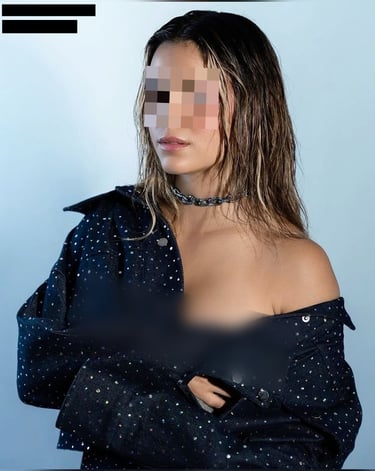
Before and After Redaction
See how easily Censor Studio masks sensitive identifiers while maintaining a clean, professional look suitable for public sharing or legal submission.
Exposed Sensitive Data
Clean Secure Redaction
Unprotected documents containing visible names, addresses, financial figures, and faces vulnerable to data leaks.
The same document perfectly secured with professional pixelation and clean black bars over private identifiers.
Frequently Asked Questions
Is it completely offline?
Yes. Censor Studio runs fully on your local Windows machine. It requires zero internet connection and never transmits your files.
Is there a subscription?
Censor Studio saved our legal team dozens of hours. The offline processing gives us complete peace of mind.
Sarah K., Compliance Director
No. Censor Studio is a one-time purchase. You buy it once and get lifetime access with unlimited local image processing.
Does it support batch editing?
100%
Offline Privacy Guaranteed
Absolutely. You can drag and drop multiple files to apply redaction templates and export them all at once.
Which Windows versions?
Censor Studio is fully optimized for both Windows 10 and Windows 11 as a native high-performance desktop application.
Start Censoring Images Today
Download the native Windows app now. One-time purchase, lifetime access, and absolute offline privacy.
Censor Studio
Fast, offline image redaction for Windows.
© 2026 Censor Studio-No subscriptions. No cloud tracking. Just a tool.
OFFLINE-FIRST IMAGE REDACTION